How can I run FTP Synchronizer as a Windows Service?
FTP Synchronizer can run as a Windows Service so your files can be synchronized without user logged in.
Using Service Manager (Recommended)
The easiest way is to use FTP Synchronizer Service Manager to install the service by clicking "Start Menu → FTP Synchronizer → Service Manager":
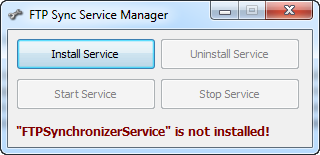
The GUI is pretty simple and easy to understand. You can use it to install, uninstall, start and stop the FTP Synchronizer Service.
Manual Installation
If you are familiar with Windows service, you can also install it manually:
- Open DOS prompt window and make sure it has administration rights.
- Go to FTP Synchronizer installation directory and run command line "FTPSyncService.exe /install"
- Open Windows Service Manager, locate "FTP Synchronizer Service", right click mouse and open "Properties" window.
- Activate "Log On" tab, select correct account and type account information.
- Click "OK" to close window and restart the service.